![[Archived] JSON Imports - Now AI Prompt Builder](/images/json-import-announcement-wide.webp)
[Archived] JSON Imports - Now AI Prompt Builder
Jan 15, 2026
This Article Has Been Archived
The original JSON Imports feature has evolved into the AI Prompt Builder. The content below is reprinted from the February 2026 Update to explain the new system.
What Happened to JSON Imports?
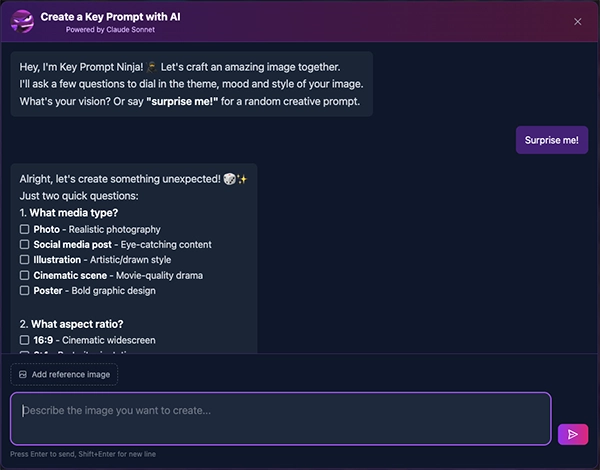
The standalone JSON Imports page has been replaced by the AI Prompt Builder — but the same JSON system powers it under the hood! Instead of manually crafting JSON in an external AI tool and pasting it in, Key Prompt Ninja now handles everything for you in a conversational interface.
Power user tip: You can still work with JSON directly! Copy the JSON from any prompt in your project, edit it manually in your favorite text editor, then paste it into the AI Prompt Builder's input field. Key Prompt Ninja will recognize it and rebuild your prompt with any updates you've made.
Same power, better experience.
A DETAILED PROMPT IN SECONDS!
Host: Key Prompt Ninja
Natural Language Prompt Generation
The AI Prompt Builder transforms how you create prompts. Instead of manually selecting from 1,430+ style options, describe what you want in natural language and let Claude Sonnet 4.5 build sophisticated prompts in seconds.
How It Works:
- Describe Your Vision - Type a natural language description of what you want
- Reference Analysis - Upload reference images for style direction
- AI Generation - Claude Sonnet 4.5 crafts a professional prompt using all available style options
- One-Click Import - Add directly to Pro Editor or Workspaces
Key Capabilities:
- Style Library Access - Full access to 1,430+ curated styles across 26 categories
- 144 Theme Options - Period-specific, cultural, and contemporary aesthetics
- Xtreme Camera Controls - Camera movements and shot types for video prompts
- Context-Aware - Understands your existing prompts and reference images
The Power of Natural Language:
Traditional Workflow:
- Browse 26 style categories
- Compare hundreds of options
- Manually combine compatible styles
- 5-10+ minutes for manual prompt creation
With AI Prompt Builder:
- "A cyberpunk street scene at night with neon reflections and a lone figure"
- Claude analyzes your description and asks key questions about the aesthetic you're going after
- Selects optimal theme, lighting, color treatment, and mood
- Complete prompt in seconds ready to generate with correct parameters and reference image URLs
Where to Find AI Prompt Builder
Ready to try it? The AI Prompt Builder is available in multiple locations:
- Homepage - Open AI Prompt Builder directly
- Pro Editor - Click the “Build with AI” button in the toolbar
- Visual Workspace - Click either the video or image AI Prompt button at the top of any prompt card
Thank you for being part of the MPM journey.